


BlockSite: Block Apps & Sites
3.83.56K Reviews
App Specs
- Version
- 2.13.4.10238
- Updated On
- License
- Free
- Downloads
- 10,000,000+
- Developer
- BlockSite
- Categories
- Productivity
- Platform
- Android, iOS
Screenshots
 Analysis by AppCompare
I tend to notice distractions most when a task has no immediate deadline: I open my phone to check one thing, then lose the thread of what I meant to do. A blocker can help by adding a little friction at the right moment. After trying BlockSite: Block Apps & Sites, I see its value less as a cure for procrastination and more as a way to make chosen boundaries easier to keep.
Who benefits from a blocker like this?
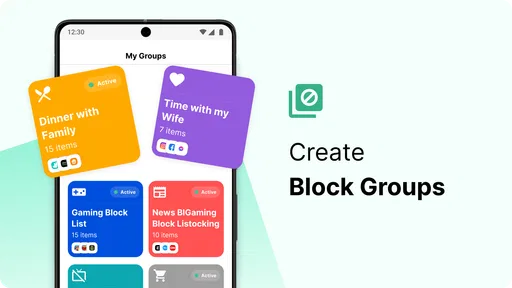
BlockSite is a productivity app from BlockSite, and its basic idea is straightforward: choose apps and websites that pull you away from a task, then block them according to your needs. I can see it suiting students who want a clearer study routine, remote workers who keep drifting to familiar sites, or anyone who wants a calmer phone at certain parts of the day. It is less compelling if you already manage distractions comfortably with your device’s built-in controls, or if you need a blocker that someone else can enforce for you.
The difference between a useful block list and an irritating one is often what you leave available. Before starting a session, I’d identify the sites and apps genuinely needed for the task, then block the tempting detours rather than shutting down everything. That small bit of preparation matters: an overly broad block can interrupt legitimate work and make you more likely to abandon the routine altogether.
A routine that works outside the ideal workday
Imagine trying to finish a report at home while messages, social feeds, and video apps compete for attention. I’d set a work window that matches the time I can actually focus, keep essential research access available, and use a break as a planned stopping point rather than treating the whole evening as one long block. The practical benefit is not simply fewer taps; it is making the choice to return to the report more automatic.
Schedules also need to reflect real life. A routine that is perfect Monday through Friday may be unhelpful on a day with an appointment or an unexpected shift in plans. I’d review the schedule when my week changes and avoid relying on a block as the sole way to keep access to something important. If a website or app is needed for urgent communication, the safer choice is to plan around that need instead of assuming every interruption is disposable.
Where BlockSite sits among alternatives
Compared with built-in screen-time or focus controls, a dedicated blocker can feel more centered on managing distracting apps and websites. Built-in tools may be a better fit if you want fewer apps to configure or prefer controls already integrated into your device. A browser-only add-on can be enough if your distraction is limited to browsing on one computer, while BlockSite makes more sense when your phone itself is part of the problem.
These approaches are not interchangeable in every situation. A blocker helps shape your own habits; it is not the same as a supervised device restriction or a workplace policy. If you need controls that another person manages, or require a guaranteed way to prevent access, I would look for a solution designed for that purpose rather than assuming a personal productivity app can provide it.
Worth Reading Before You Choose

EA SPORTS FC Mobile 26 Is a Bigger Football Game, but It Takes Time

Flipboard Shows What News Apps Must Do Beyond the Feed

Switching to Android Auto Means Rethinking Your Driving Routine

Google Calendar Makes a Crowded Week Easier to Manage

Ludo King Makes the Most of the Minutes Between Plans

Baby Panda World Brings Quick Play to Modern Phones, but Its Game Library Feels Busy
Details worth checking before you commit
BlockSite is free to start, is rated for Everyone, and has an average rating of 3.9 from around 56,000 ratings, with over 10 million installs. It has been available since February 27, 2018; version 2.9.9.2.9550 lists Android 7.1 as the minimum operating system. Optional in-app purchases range from $0.49 to $199.99 per item, so I’d check what a paid option unlocks and whether it solves a specific need before spending money. The rating and popularity suggest plenty of people have tried it, but neither tells me whether its approach will suit an individual routine.
One useful habit is to test a short, low-stakes schedule first. Try blocking one or two obvious distractions during a single work period, then notice what gets in the way: a blocked page you genuinely need, a break that arrives at the wrong time, or a rule you keep wanting to bypass. Adjusting from that experience is more sensible than building a complicated setup before you know which interruptions matter most.
Another trade-off is that a strict boundary can help when temptation is predictable, but it can also create friction when plans change. I would keep a note of essential sites or apps before a session and think through how I’ll handle a legitimate exception. That preparation is especially useful for people who rely on their phone for mixed personal and work tasks, where the same device can be both a distraction and a practical tool.
BlockSite is not a replacement for attention support, accessible device settings, or a realistic workload. If distraction is tied to stress, fatigue, or an environment full of interruptions, blocking a few apps may only address one part of the problem. I’d treat it as one option in a larger routine, not as evidence that someone simply needs more willpower.
What’s BlockSite All About?
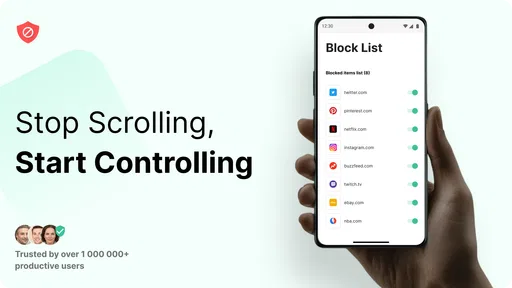
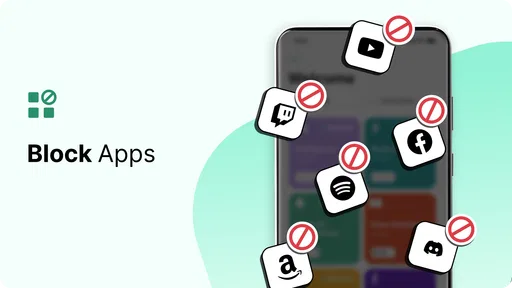
First off, let’s talk about what BlockSite actually does. This app is designed to help you regain control of your time by blocking distracting websites and apps on your device. It’s like putting up a virtual "Do Not Disturb" sign, but way more high-tech. You can customize it to block specific sites and apps at certain times, making it perfect for those of us who need a little help staying on task.
User-Friendly Setup
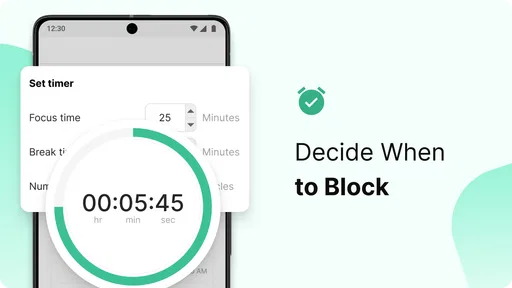
Setting up BlockSite was a breeze. I was worried it might be complicated, but it’s as straightforward as it gets. You just download the app, grant the necessary permissions, and start adding sites and apps to your block list. The interface is super intuitive, so you don’t need to be a tech wizard to navigate it. Plus, it offers a neat little feature where you can set up work sessions with scheduled breaks. This is a game-changer for maintaining productivity without burnout.
Features That Stand Out
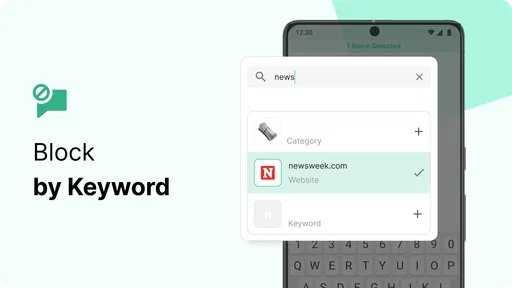
One of my favorite features is the ability to block sites and apps based on keywords. Let’s say you want to avoid all things related to “social media” during work hours; just add it as a keyword, and BlockSite takes care of the rest. It’s like having a personal assistant who knows exactly what you shouldn’t be doing.
Another cool feature is the "Scheduled Blocking," which allows you to create daily routines. Whether it’s turning off distractions during work hours or blocking apps at bedtime, this feature helps create boundaries that are essential for a balanced digital life.
Customizable and Flexible
BlockSite isn’t a one-size-fits-all solution, which is what I love about it. You can tailor it to fit your lifestyle. For instance, you can use the "Focus Mode" to concentrate on important tasks by temporarily blocking all non-essential apps and sites. And if you’re working on a project that requires specific websites, you can create a "Whitelist" to ensure you still have access to necessary resources.
Boosting Productivity
Here’s the kicker: I actually felt more productive after using BlockSite. It’s easy to underestimate how much time we waste on distractions until you actively block them out. With fewer interruptions, I found it easier to focus and complete tasks more efficiently. It’s like giving your brain the space it needs to think clearly without the constant buzz of notifications.
Accessibility, context, and limits
For readability and navigation, the simple setup I encountered is a real strength: choosing a short list of distractions is easier to manage than building a complicated system. I’d still keep the list concise and use clear, recognizable names for rules. That makes it easier to remember why a site is blocked and to spot a mistaken choice when a routine no longer fits.
Motor and sensory needs vary, so I wouldn’t assume a blocker makes a phone accessible by itself. A person who finds repeated navigation tiring may appreciate setting a routine in advance rather than editing rules every time they want to focus. On the other hand, frequent adjustments can become extra interaction and frustration. I’d pair the app with the device’s own display, input, and notification settings when those are the real barriers, and test the combination in ordinary use rather than expecting one app to cover every need.
Situational access matters just as much. At bedtime, a scheduled boundary may be easier than repeatedly deciding whether to open a distracting app. During a work session, the same restriction could be unhelpful if a family member, colleague, or care contact might need to reach you through a blocked channel. I’d decide in advance which communication routes must stay usable and choose a narrower block when availability matters.
For someone sharing a device or moving between work and personal tasks, I would be cautious about a single broad setup. A rule made for focused study can interfere with errands later in the day; a keyword rule can also catch material that is relevant rather than distracting. Starting with one test session, then checking what it blocked, is a practical way to find that boundary without turning an ordinary task into troubleshooting.
A balanced fit, not a universal answer
The app’s strongest use is giving a willing user a structured nudge: scheduled rules, focus sessions, and a selected list can reduce the number of easy detours. Its limits show up when a person needs reliable access at all times, wants another person to manage restrictions, or finds configuring digital tools more burdensome than the distraction itself. In those cases, built-in device controls, a simpler routine, or help from someone who understands the user’s access needs may be a better starting point.
Overall, I’d recommend BlockSite: Block Apps & Sites to someone who can name the distractions they want to reduce and is willing to tune the rules around real life. I would not treat it as a universal accessibility solution or a substitute for judgment about urgent access. Used selectively, it can make a chosen boundary easier to follow; used too broadly, it can become one more obstacle in a day that already has enough of them.
A Few Things to Consider
While BlockSite is a fantastic tool, it’s important to remember that it’s not a magic wand. Discipline is still key. The app can guide you and help set boundaries, but sticking to them is ultimately up to you. Also, while most features are free, there are premium options that unlock additional functionalities like unlimited blocking lists and advanced scheduling. These might be worth considering if you need more robust controls.
Overall, I’d say BlockSite is a must-try for anyone looking to enhance their productivity and reduce digital distractions. It’s like having a little guardian on your shoulder, nudging you back on track whenever you stray. And let’s be honest, who wouldn’t want that in today’s distraction-filled world?
Pros
- Easy to use interface for quick setup.
- Customizable block schedules for flexibility.
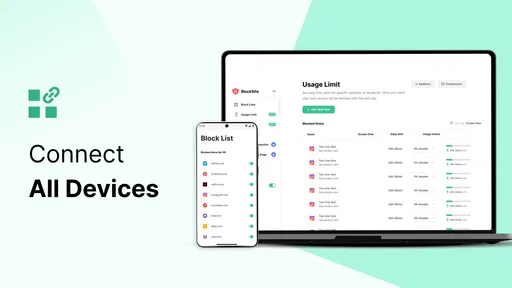
- Syncs across devices for consistent blocking.
- Includes a focus mode for productivity.
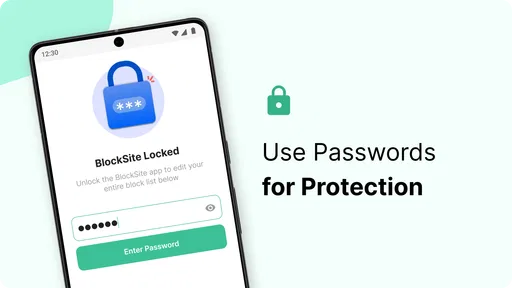
- Password protection for app settings.
Cons
- Limited features in the free version.
- May slightly impact device performance.
- Notifications can be intrusive at times.
- Requires permissions that some might find invasive.
- Ads in the free version can be distracting.
FAQs for BlockSite: Block Apps & Sites
What is BlockSite and how does it work?
BlockSite is an application designed to help users increase productivity by blocking distracting websites and apps on their devices. Once installed, users can create lists of sites and apps they wish to block. The app also features a focus mode to schedule blocks during specific times, ensuring maximum concentration when needed.
Is BlockSite available for both Android and iOS devices?
Yes, BlockSite is available for both Android and iOS platforms. Users can download the app from the Google Play Store or the Apple App Store. It offers a seamless experience across both operating systems, allowing users to manage distractions effectively regardless of their device choice.
Does BlockSite offer any customization features?
BlockSite provides a variety of customization options to suit individual needs. Users can create personalized block lists, schedule blocking times, and even set up password protection to prevent unauthorized changes. The app also includes a work mode to block distractions during work hours and a break mode to allow access during leisure time.
Can BlockSite help improve productivity and focus?
Absolutely! BlockSite is designed to enhance productivity by minimizing distractions. By blocking access to time-wasting websites and apps, users can focus better on their tasks. The app's scheduling feature allows users to set specific focus times, ensuring they stay on track with their work or study schedules.
Is there a cost associated with using BlockSite?
BlockSite offers both free and premium versions. The free version includes basic blocking features, while the premium version provides additional functionalities such as unlimited blocking lists, more advanced scheduling options, and enhanced support. Users can choose the version that best fits their needs and budget.


